

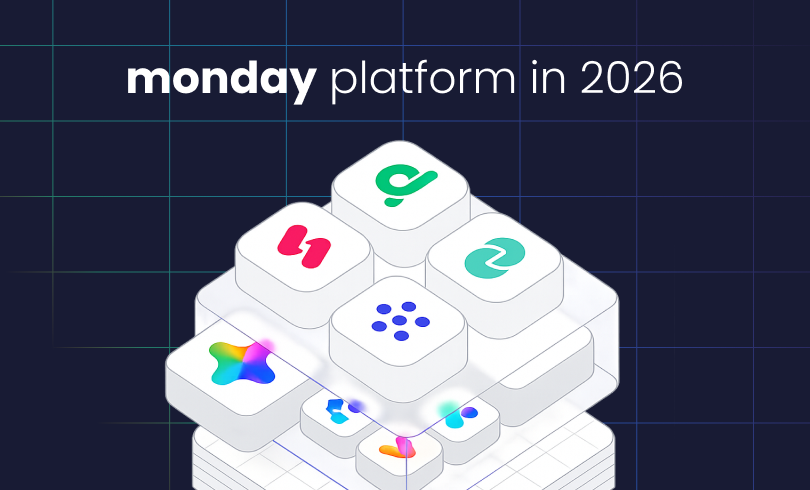
If you last looked at monday.com a few years ago, you probably still think of it as a flexible work OS for projects and task tracking. That’s still true, but that’s only part of what monday.com does now.
Today, monday.com is more than a project tracker. You can shape it around work management, CRM, service, and product development. Automation, dashboards, integrations, marketplace apps, and a growing set of AI features are now part of everyday workflows. They’ve redefined themselves as an AI work platform, but most teams just see it as a system that adapts to a wide range of needs.
This shift matters because it changes what you need to look for when deciding if monday.com fits your business.
For some teams, monday.com is still a straightforward way to organize projects and daily work. For others, it becomes the system that connects sales, delivery, service, reporting, and automation across the business, enhanced with AI capabilities. If you build it without enough structure, though, it can get messy faster than you expect.
Here’s a look at what monday.com actually is, how it’s structured, what the main products do, where AI fits in now, and how to figure out if it’s the right fit for your business. If you’re curious about what monday.com costs in 2026, you can read more about that here.
What is monday.com?
monday.com is a flexible platform for planning, managing, automating, and tracking work across teams, from small businesses to large enterprises, and everything in between.
At a basic level, it gives teams a way to organize work in shared boards, views, dashboards, and workflows. At a broader level, it can support everything from project delivery and request intake to sales pipelines, customer service operations, product development, approvals, resource planning, and cross-functional reporting.
That’s why monday.com can look simple at first, but gets a lot bigger once you dig in. It’s built so different teams can use it in their own way, while still keeping work visible in one place. The main products cover work management, CRM, service, and dev, with AI and advanced automation now built into the experience.
What products are part of monday.com now?
A lot of older guides are out of date because they treat monday.com like it’s just one general-purpose tool. That’s not how most businesses are using it today.
monday Work Management
This is the part of the platform many people know first. Try it →
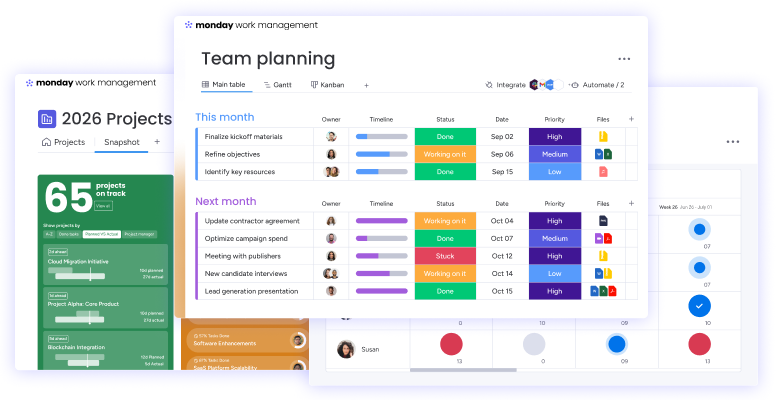
monday Work Management supports project management, task coordination, request and approval management, resource visibility, operational workflows, and cross-team planning.
If your team needs a better way to manage work, deadlines, handoffs, and visibility across departments, this is usually where you start. Work Management connects day-to-day execution to bigger business goals, not just task tracking.
monday CRM
This is the part of the platform built for sales teams and revenue operations. Try it →
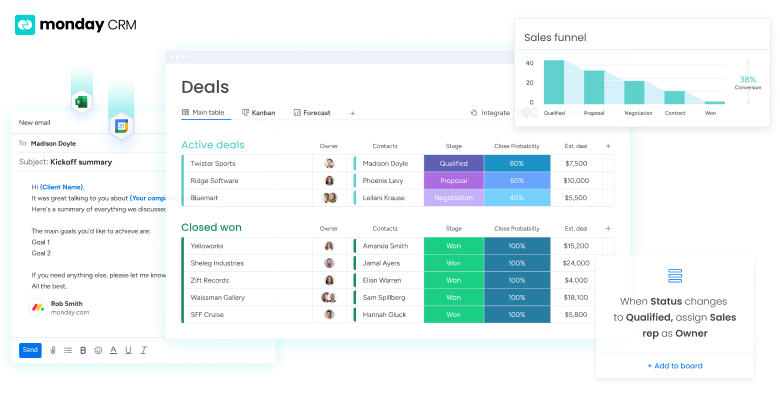
monday CRM helps manage pipelines, contacts, activities, deals, customer journeys, and follow-up, but without the heavy, rigid feel of older CRM tools.
Right now, monday.com calls it an AI-first CRM focused on automating customer journeys and improving revenue operations with AI insights. In practice, most teams use it because it’s easier to adapt than traditional CRMs.
monday Service
This is the part of the platform built for service management. Try it →
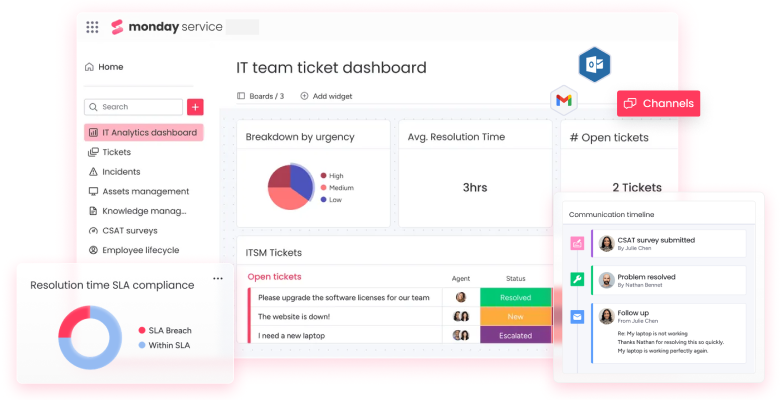
monday Service is built for support, ticketing, intake, triage, routing, help desk, and resolution workflows.
This matters for teams that need more than a shared inbox or a basic ticket list. monday Service gives teams a way to structure requests, automate routing, connect service work across teams, and build better visibility around response and resolution. The focus now is on helping service teams scale up with more structure and automation.
monday Dev
This is the part of the platform built for product and engineering workflows. Try it →
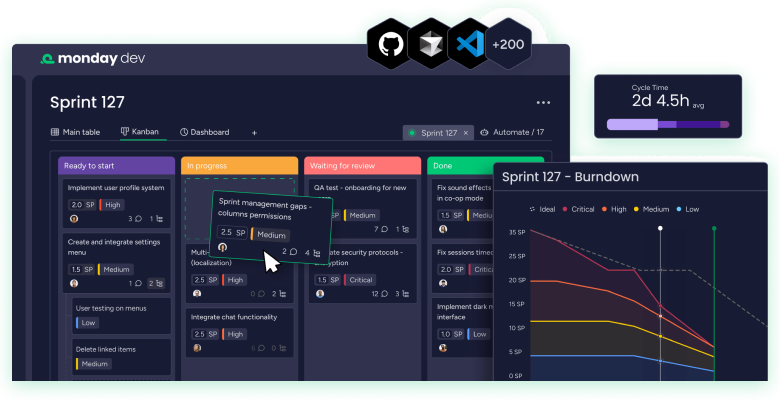
monday Dev covers sprint planning, backlog management, roadmaps, release coordination, and cross-team product work.
If you want product, engineering, and business teams working from the same playbook, monday Dev is usually where you start. The focus is on flexible pipelines, automation, and real-time visibility for product work.
AI, apps, and add-ons
The platform also extends far beyond those four core products. That includes a growing set of AI features, automations, integrations with other tools, and marketplace apps that expand what the platform can do.
If you still think of monday.com as just a digital spreadsheet with colorful columns, that’s a very old picture. The latest AI features include things like AI Blocks, AI Notetaker, Vibecoding App Builder, monday sidekick, and digital assistants built into the platform.
What can you actually do with monday.com?
This is where monday.com gets interesting. It’s not a fixed system with just one use case. You can shape it around the way your work actually moves. If you want more concrete examples, we also break this down in our guide to 8 Business Use Cases for monday.com.
Now we’ll cover some of the most common things teams use it for:
Managing projects and recurring operational work
Teams use monday.com to coordinate internal projects, client delivery, launches, approvals, marketing operations, onboarding workflows, and recurring business processes. It works well when visibility and ownership matter, especially when work crosses multiple people or departments.
Running sales and CRM workflows
Sales teams use monday CRM to manage leads, track pipeline stages, coordinate follow-up, capture account activity, and keep reporting cleaner across the funnel. It’s often a good fit for businesses that want a CRM more connected to operations, implementation, or post-sale work.
Handling service requests and support processes
With monday Service, teams can manage intake, routing, escalation, service tasks, and resolution in a more structured way. This is especially useful for internal support teams, customer service, and any group that needs a more operational approach to service work.
Supporting product and dev work
With monday Dev, product and engineering teams can manage sprints, stories, roadmaps, prioritization, and release work, while staying aligned with the rest of the business.
Automating repetitive work
One of monday.com’s biggest strengths is reducing manual work. Teams can automate reminders, ownership changes, notifications, routing, status-based actions, repetitive updates, and other steps that would otherwise eat up time.
Building better reporting and visibility
Dashboards, connected views, and structured workflows make it easier to see where work stands, where handoffs break down, where capacity is tight, and where leadership is missing a clear view of performance.
That flexibility is a big reason monday.com has grown beyond project management. It also means you need to pay more attention to how the system is structured. A platform this configurable can support a lot, but it can also get cluttered fast if the setup doesn’t match how your business actually works.
How AI fits into monday.com now
AI is one of the main reasons this topic needs a fresh look.
A few years ago, AI wasn’t really part of the monday.com conversation. Now, it’s much more central to how the platform works and how teams use it.
monday’s AI ecosystem currently includes AI blocks, AI columns, AI workflows, monday sidekick, monday vibe (a vibecoding app/solution builder), and AI Agents or digital workers that support use cases like service resolution, deal progression, research, task summarization, and risk detection. monday’s own AI materials describe AI Blocks as modular components that teams can add to workflows without code, and recent examples include specialized AI roles such as Service Agent, AI SDR, Deal Facilitator, and Research Assistant.
In practice, AI on monday.com isn’t just about generating text.
It is increasingly about helping teams:
- Summarize updates and notes
- Categorize or enrich information automatically
- Detect risk or blockers earlier
- Route work more intelligently
- Support sales follow-up and pipeline movement
- Automate parts of service and operational decision-making
That doesn’t mean every business needs to use every AI feature. But any current look at monday.com should recognize that the platform now includes an AI layer that can change how teams work, automate, and scale.
How monday.com is structured
Even though monday.com has expanded into multiple products, AI features, apps, and add-ons, the platform basics still matter.
If you are new to monday.com, this is the simplest way to think about it: the platform is made up of a few core layers that work together. Some help organize where work lives, some define how the workflow runs, and some help teams view, automate, and report on that work more effectively.
Products
At the highest level, monday.com is organized into the products mentioned previously: monday Work Management, monday CRM, monday Service, and monday Dev.
Each product is built for a different operational use case, but they all share the same general platform logic. That means the experience may vary by product, while the core structure still feels familiar across the platform.
Workspaces
Workspaces organize broad areas of work inside the account.
A business might have separate workspaces for sales, operations, marketing, service, or internal systems. They help teams keep related workflows grouped together and create cleaner boundaries between departments, functions, or business units.
Boards
Boards are where most of the actual workflow structure lives.
A board can represent a pipeline, project tracker, request queue, onboarding process, service workflow, content calendar, or almost any other repeatable system. In most cases, the board is where a team defines how a process will be managed day-to-day.
Items
Items are the individual records or work units inside a board.
Depending on the workflow, an item could be a deal, task, request, support ticket, campaign, client, project, or deliverable. If the board represents the process, items represent the actual things moving through that process.
Columns
Columns define the information each item carries and help shape how the workflow actually functions.
They can track details such as status, owner, due date, priority, deal value, request type, and approval stage, but they also do more than store information. Columns help teams sort work, keep processes consistent, trigger automations, power views, and support cleaner reporting.
Views
Views let teams look at the same workflow in different ways without rebuilding the underlying structure.
One team may prefer a table view, while another needs a timeline, Kanban board, calendar, workload view, or chart. Views make the same data easier to manage, depending on the type of work and the decisions a team needs to make.
Dashboards
Dashboards pull information from one or more boards into a clearer reporting layer.
This is where monday.com often becomes much more valuable for managers and leadership, because dashboards make it easier to spot bottlenecks, track workload, monitor performance, and gain cross-functional visibility without manually digging through each workflow.
Automations and integrations
Automations reduce repetitive steps inside monday.com, while integrations extend native possibilities and connect the platform to the rest of your tools.
Together, they help teams move information more reliably, cut down manual work, and keep workflows connected across systems rather than managing work in silos.
Why businesses choose monday.com
Most businesses don’t go looking for monday.com because they want prettier boards.
They look for it because something about the business feels harder to run than it should be. Maybe it’s project visibility, manual work, messy sales handoffs, a lack of trust in reporting, disconnected tools, or just the sense that every team has its own process but nobody has a clear view of the whole system.
monday.com stands out for businesses that want more structure without being locked into a rigid tool that only solves a single, narrow operational problem.
Common reasons teams choose it include:
- They need workflows that can be shaped around how the business actually works
- They want one platform that can connect multiple teams or stages of work
- They need better visibility across delivery, sales, service, or operations
- They want to reduce manual work with automations
- They want a system that is easier to adapt than many legacy tools
- They want to build around their process, not just tasks
That said, flexibility isn’t the same thing as simplicity.
The platform can feel approachable on the surface, but businesses with real complexity usually need more thought about architecture, governance, rollout, and adoption than they initially expect.
Who is monday.com a good fit for?
monday.com is usually a strong fit for businesses with enough operational complexity to need better structure, but who still want flexibility in how they build it.
That often includes:
Growing teams that have outgrown spreadsheets or scattered tools
If work is spread across spreadsheets, inboxes, chat threads, and disconnected apps, monday.com can create a more usable shared system.
Operations-led businesses that need clearer workflow design
For operations teams, PMO leaders, systems-minded managers, and cross-functional owners, the platform is often attractive because it supports both the work itself and the visibility of that work.
Sales and service teams that need better handoffs
For organizations trying to connect pre-sale, post-sale, and support workflows more cleanly, monday.com can work well because it’s not limited to one department’s view of the customer.
Existing users who know their setup is getting messy
A lot of businesses first adopt monday.com through one team, then expand it without enough structure. At that stage, the problem usually isn’t whether the platform can do enough. The problem is whether the architecture still makes sense.
When monday.com is a strong fit and when it is not
This is where many surface-level articles fall short. They treat monday.com as if it were right for everyone. Truthfully, it’s not.
monday.com is a strong fit when:
- You need flexible workflows across teams
- You want better visibility into work, ownership, deadlines, and reporting
- You want to connect sales, operations, service, or project work in one environment
- You need automation without building a deeply technical system from scratch
- You want room to evolve the setup as the business changes
monday.com may not be the best fit when:
- You only need a very simple personal task list
- Your team is not willing to standardize processes at all
- You want a rigid out-of-the-box system with almost no configuration decisions
- You expect the software alone to solve workflow issues without real process clarity
That last point matters more than people think.
monday.com can absolutely support strong operations, but if the underlying process is unclear, the platform won’t fix that on its own. Sometimes it just makes the mess more visible.
The biggest mistake teams make with monday.com
The most common mistake is treating the flexibility of monday.com like a shortcut. Since monday.com is easy to start using, teams often assume it’ll be easy to scale cleanly. They build quickly, create boards team by team, add automations as they go, and only later realize the system has started to drift.
That usually shows up as:
- Duplicate or inconsistent workflows
- Cluttered boards
- Reporting that leadership does not fully trust
- Automations that break or conflict
- Weak ownership across teams
- Adoption that falls off because the setup feels harder to use than expected
This isn’t really a software problem. It’s a design problem. The best monday.com environments usually balance flexibility with structure. That means thinking through process logic, ownership, permissions, reporting, naming conventions, automation strategy, and cross-team handoffs before the system sprawls.
Do you need a monday.com partner?
Not every team does.
Some smaller or simpler use cases are entirely reasonable to handle in-house, especially if the workflows are limited, the rollout is small, and someone internal has the time to own the build. Get a better understanding of what it takes to successfully implement monday.com.
But the more complexity you add, the more the hidden cost tends to shift away from software and toward internal lift, rework, misalignment, and adoption drag. That’s usually when bringing in a partner makes sense. Here are 7 signs it might be time to hire a partner.
A good monday.com partner helps with more than setup. They help you translate real operational needs into a system your team can actually trust and use. That includes architecture, workflow design, automation logic, dashboard structure, integrations, rollout planning, and long-term maintainability. If your business is dealing with multiple teams, sales-to-operations handoffs, service workflows, dashboards that leadership needs to trust, or a rollout that needs real adoption, partner support becomes much more valuable. That matches what I see in practice and how monday itself distinguishes delivery expertise through partner tiers. See a deeper breakdown of what monday.com partners do here.
So, what is monday.com really in 2026?
The simplest answer is this:
monday.com is a flexible work platform that supports projects, operations, CRM, service, and product workflows in one connected environment. Automation, reporting, integrations, marketplace extensions, and AI now play a much bigger role than they did a few years ago. That means better ways to manage your work.
For some teams, that means a better way to manage work. For others, it becomes a much more central operating layer across the business.
The real question is not just what monday.com is. It is whether your team knows what it actually needs from the platform, how cleanly those workflows should be designed, and what kind of structure will hold up as the business grows. That’s what we help our clients accomplish every single day.
If you get that part right, monday.com can become far more than a task tracker. It can become a system your team actually runs on.